AI Assistant
The AI assistant in Kasyro POS: ask about sales, stock and the catalog in plain words, confirm suggested changes, dictate by voice and keep an eye on the monthly limit.
The AI assistant is a chat where you ask the register questions in plain words. It answers questions about your data (sales, catalog, inventory, receipts, customers, shifts) and can also change things in the company — always only after you confirm the change.
Open it with the AI Assistant button in the side panel if the owner has put it there, otherwise from More → AI Assistant (on a phone, from the More bottom sheet); the same applies in Office mode.
For the assistant to appear in the menu and answer, all of these must hold:
| Condition | Where it is set |
|---|---|
| Premium or Enterprise plan | Not available on Free (see Subscription) |
| Module switched on | Settings → System → Modules → AI Assistant |
| The Use AI assistant permission | Granted to the user by an administrator |
| Internet connection | The assistant runs through the Kasyro server |
The module is off by default — after moving to Premium, switch it on first.
In the demo the assistant doesn't run, because the demo doesn't talk to the server. The module is off in Settings → System → Modules with an “Available in Premium” label, and the AI Assistant button isn't shown.
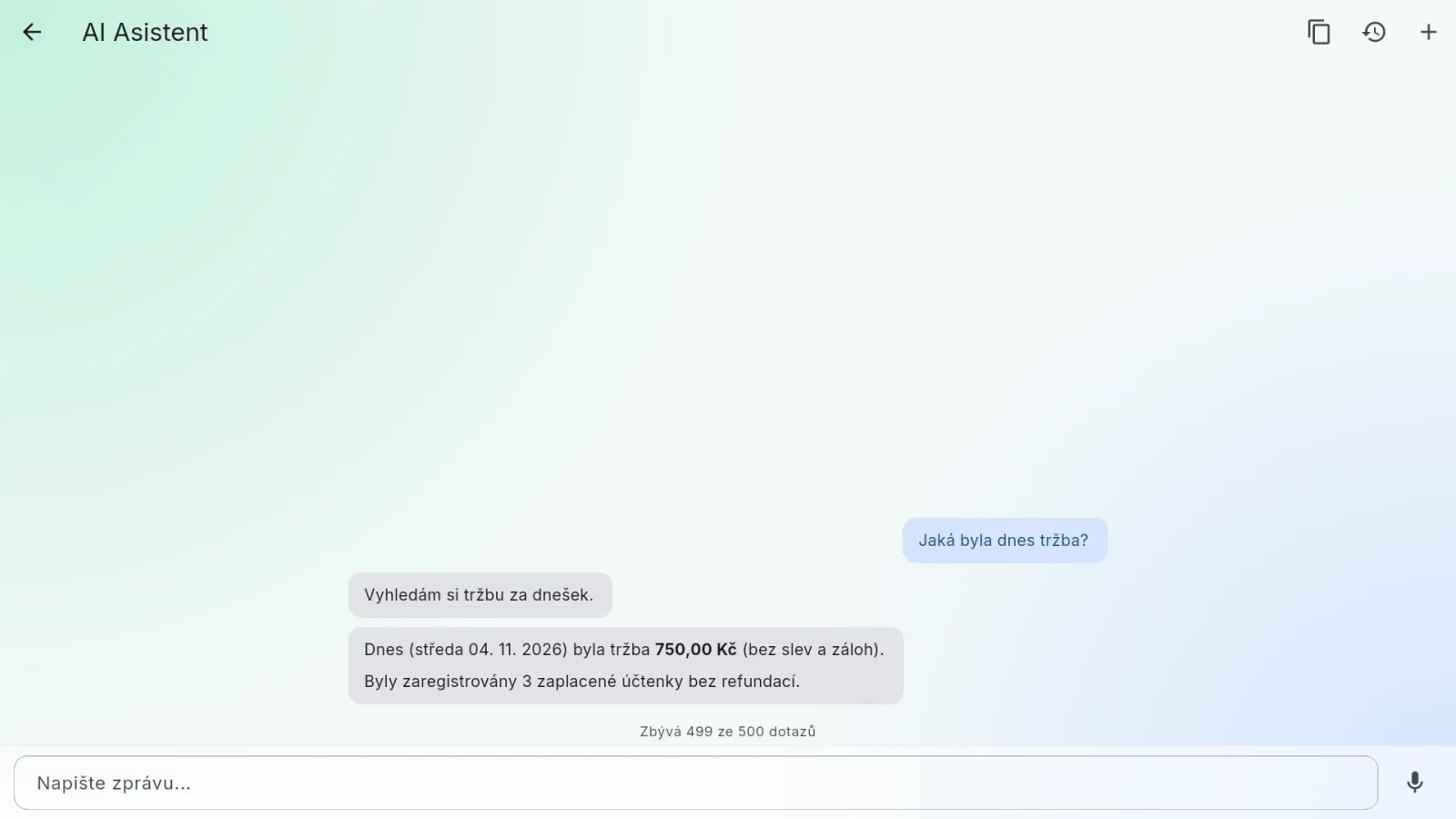
The assistant screen has a header with buttons at the top, the conversation in the middle and the Type a message... input with a microphone at the bottom. After the first answer, a line above the input shows how many queries you have left this month, for example “63 of 100 queries left”.
What you can ask
The assistant sees only what you have permission to see. Whatever you couldn't see on the screens yourself, it won't list either.
| Area | What to ask about |
|---|---|
| Receipts and orders | Receipts by status and period, receipt detail with items and payments |
| Catalog | Products, categories, VAT rates, manufacturers, suppliers, modifier groups, recipes |
| Customers | Finding a customer, details, points and credit history |
| Vouchers and coupons | List and detail; a voucher past its validity date is shown as Expired |
| Reservations | List and detail of reservations |
| Spaces | Sections and tables |
| Inventory | Stock levels, stock documents and movements |
| Reports | Sales, revenue, tips, orders, shifts, closing reports |
| Sales by day and hour | The strongest day, the busiest weekday and hour |
| Users | List and detail of users, roles |
| Settings | Active payment methods, registers, currencies, warehouses, company settings (e.g. loyalty programme, discount limits) |
Ask naturally — “what were yesterday's sales”, “how many napkins do we have in stock”, “which product is the most expensive”, “which day this month was the strongest”. The assistant works out the period from today's date and the venue's time zone; weeks start on Monday.
Long lists. The assistant takes at most 100 records into one answer (for dated lists, the most recent ones). Counts and totals are still calculated from all matching records. If not everything fit, a small note under the answer says “Only part of the records is shown (100 of 250).” — narrow the question (a shorter period, one status).
Suggested questions. An empty conversation starts with a “Hi, I'm Kasyro!” card and offers three ready-made questions under Try asking. Tapping one sends it straight away. They are always just questions — nothing offered there changes data. The three change from day to day and follow your permissions and enabled modules, so two people at the same register may see different ones.
What the assistant can change
It never makes a change on its own — it proposes it first and waits for your confirmation.
| Can create | Can edit |
|---|---|
| Products, categories, VAT rates, manufacturers, suppliers | The same records |
| Customers | Customers, their points and credit |
| Vouchers and coupons | Vouchers and coupons |
| Sections and tables | Sections and tables |
| Reservations | Reservations |
| Modifier groups, recipes | Modifier groups, recipes, assigning modifier groups to products, a product's price within a group |
| Stock documents (receipt, issue, correction, stock count) | — |
| — | Users (basic details) and company settings |
Variants, portions, modifiers and recipes
The assistant sets up the catalog the same way the product editor does (see Catalog):
| You ask for | The assistant does |
|---|---|
| “Add sizes S, M, L to the T-shirt” | Creates S, M, L as variants of the T-shirt |
| “I sell rum in 2 cl and 4 cl” | Creates 2 cl and 4 cl portions under Rum; selling a portion deducts 0.02 l / 0.04 l from Rum's stock (Rum must track stock) |
| “Ketchup in the Sausage group for 5” | Adds Ketchup to the group with its own price in the group; sold on its own, it keeps its regular price |
| “Toast has 10 g of butter” | Adds Butter to Toast's recipe |
| “Butter isn't sold, only used in recipes” | Creates Butter with “On sale” off |
The same rules as in the editor apply: a portion needs a parent product with stock, a product with a recipe doesn't track its own stock, a product with variants has no recipe (each variant has one), a portion can't be a recipe ingredient and the same ingredient can't appear twice in one recipe. When something isn't possible, the assistant says so in the same words as the editor and saves nothing. It sets the target markup within 0–999 %.
Other rules
- Voucher validity given only as a date (“valid until 31 December”) lasts until the end of that day.
- Sections, tables and categories are not switched off when Settings wouldn't allow it either — the default section, a section or table with an open bill or an upcoming reservation, and a category with products or subcategories. The assistant tells you what to do first.
- A reservation on an occupied table is saved (Kasyro allows it), and the assistant tells you which reservations overlap.
The assistant deletes nothing
However you ask, it won't remove a product, category, customer, voucher, table or anything else — it replies straight away that it can't and points you to the screen where you can. It can only remove a link: take a product out of a modifier group or remove a modifier group from a product.
Confirmation card
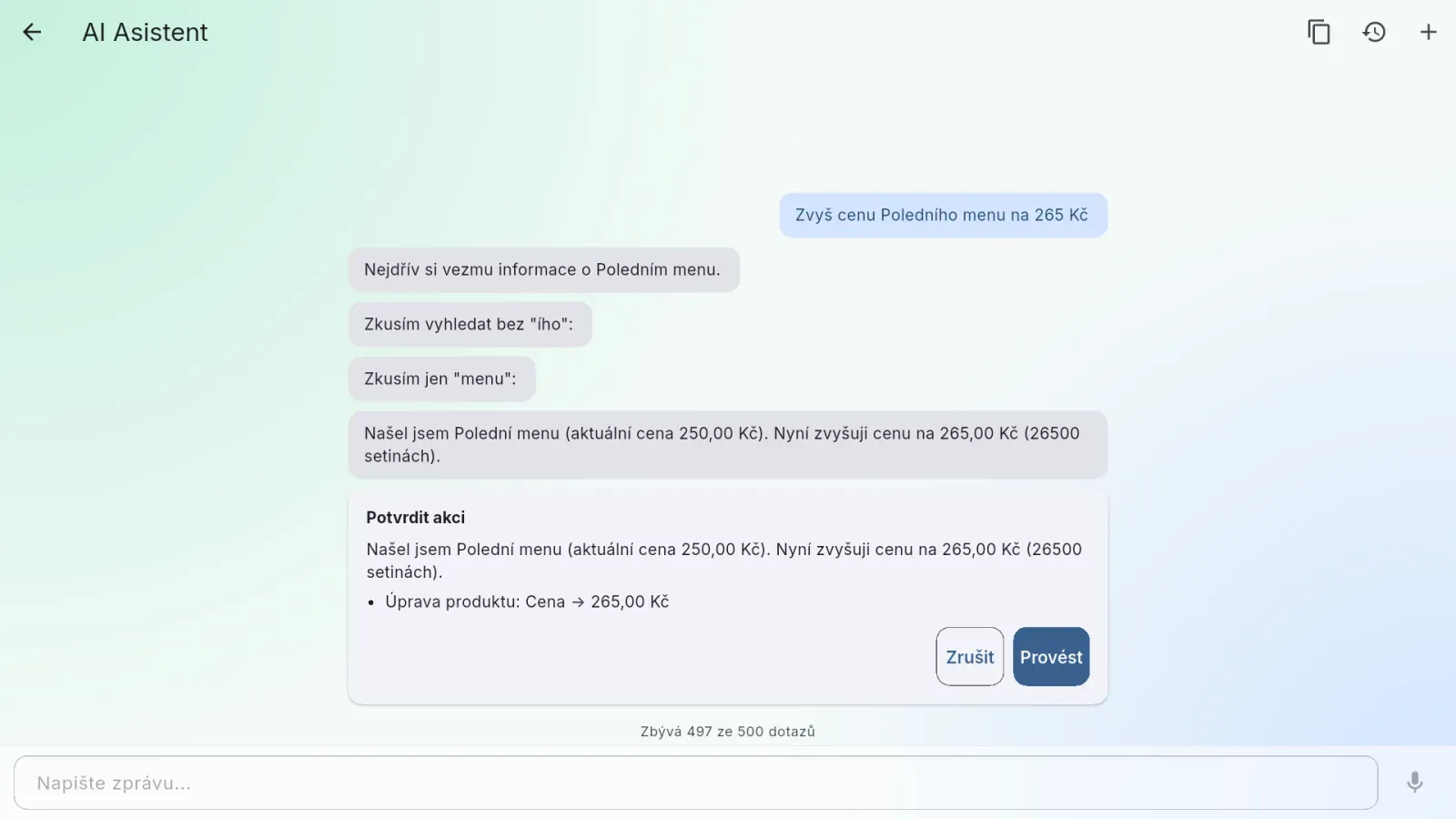
When the assistant wants to change something, a Confirm action card appears in the chat:
- the assistant's sentence — how it described what it is about to do,
- a list of operations below it — line by line, what the button will actually do, including the changed fields and new values for edits (for example “Product edit: Price → 7.00”),
- the Cancel and Execute buttons.
Read the list, not just the sentence. The sentence is the assistant's own wording and differs every time; only the list says what will happen.
| Button | What it does |
|---|---|
| Execute | Carries out all operations in the list with one tap |
| Cancel | Carries out nothing from the whole list |
Until you answer the card, the input is locked.
The card is valid for ten minutes. Then the buttons are replaced by “The confirmation expired, so nothing was done…” and nothing is carried out — a forgotten card on the register can't be tapped by anyone later. The input unlocks by itself. Ask again; the assistant recalculates the operation from the current state.
Undo and Try again
| Action | Where it appears | What it does |
|---|---|---|
| Undo | Under the last answer to a question where the assistant created something | Removes what the assistant created for that question |
| Try again | Under an answer that ended in an error | Sends your last question again |
About Undo:
- The whole set is undone at once — if one Execute created a category and two products, one Undo takes back all three.
- It works for 30 minutes after the change.
- It undoes only creation, not edits. Fix a change to an existing record (price, points, credit) on the relevant screen, or ask the assistant for the opposite change. Creating a reservation, modifier group, recipe or stock document can't be undone either.
After you tap it, the assistant says what happened — undone, only partly undone, or the 30 minutes have passed.
Numbers come only from your data
The assistant may calculate with numbers from your data (add up, find the largest, work out a difference or percentage), but it must not make up a figure it wasn't given. That's why it sometimes replies that it has no tool for something — treat that as a correct answer, not a fault. It beats an invented number.
The same goes for older periods. A register on a subscription holds documents for the last 31 days (an Enterprise contract can arrange a longer period). When you ask about an older period, the assistant says the data isn't on the device and why — it never reports zeros instead. It also requests that period, so the same question can be answered a little later.
Conversations
The header has three buttons:
| Button | What it does |
|---|---|
| Copy conversation | Copies the conversation to the clipboard |
| Conversation history | A searchable list of earlier conversations; tap one to switch to it, use the bin icon to delete it from the history |
| New conversation (+ icon) | Starts an empty conversation |
When the assistant gives odd answers, start a new conversation. With each question the assistant also reads its earlier answers in the same conversation — you don't have to repeat the context, but one wrong answer can be repeated. A new conversation deletes nothing; the previous one stays in the history. Once a conversation has more than 20 messages, the assistant offers a new one itself.
Deleting a conversation (Delete the conversation?) removes it only from the history — what the assistant changed in it stays.
The history is on this device only, and only yours. Conversations are not stored on the server: you won't see them on another register, a colleague on the same register sees only their own, and after removing local data or reinstalling, the history is gone. The server keeps only a record that the venue asked a question (for counting monthly queries), without the question or answer text.
Voice dictation
When the input is empty, a microphone icon (Voice input) sits next to it. Tap it to start recording (the icon turns into a red Stop recording), tap again to stop, and after a moment the transcribed text appears in the input. It isn't sent automatically — you can edit it and then send it with the arrow.
- Recording stops by itself after 60 seconds.
- If the app isn't allowed to use the microphone, “Could not start recording. Check that the app is allowed to use the microphone.” appears. Allow the microphone in the system settings.
- Transcription doesn't use up monthly queries, but it has its own cap, and with the monthly queries used up nothing is transcribed.
A message can be at most 4,000 characters long.
Query limits
Normal use runs into the monthly number of queries at most; the other caps are safeguards. Kasyro sets the limits, and none of them affects selling.
| Cap | How much | For whom |
|---|---|---|
| Monthly queries | 100 on Premium, 500 on Enterprise, plus any purchased queries | The whole venue |
| Hourly limit on the register | 60 queries per hour | Each user on each device separately |
| Hourly limit for the venue | 60 assistant calls per hour | The whole venue together |
| Daily cap | 400 calls per 24 hours | The whole venue |
| Voice transcriptions | 20 per hour | The whole venue |
| Conversation length | At most 200 messages | One conversation |
Monthly queries. Only the question you ask counts — not the steps the assistant takes to fetch data. A rejected question doesn't count. The line above the input shows what's left:
- “63 of 100 queries left” — the normal state (on Enterprise “… of 500 queries”);
- “Plan queries used up · 43 extra credits left” — purchased queries are being used (they don't expire);
- “Queries used up · resets on 1 Dec” — the assistant won't answer until that date.
Plan queries reset on the 1st of each month. Buying more queries is arranged by the owner with Kasyro.
Hourly limits. One question is usually one to several calls (each data lookup is another call), so when several people ask in the same hour, the venue limit may come sooner than after 60 questions.
Error messages
| Message | What to do |
|---|---|
| The AI assistant is part of the Premium plan… | Moving to Premium is up to the owner (see Subscription) |
| The AI assistant is not available in the demo… | Try it in a real venue |
| The AI assistant is switched off… | Turn it on in Settings → System → Modules |
| No venue is linked to this account… | Finish linking the venue, or sign out and sign in again |
| Your session has expired… | Sign in again and repeat the question |
| You have used up the hourly question limit… | The limit resets within the hour |
| The monthly query allowance is used up. It resets on the 1st. | Queries reset on the 1st of next month |
| The assistant has reached its daily call limit… | Try again tomorrow |
| This conversation is too long for the assistant… | Start a new conversation |
| The confirmation expired, so nothing was done… | The card was open for more than 10 minutes — ask again |
| The AI assistant is unavailable because of a setting on our side… | It isn't your venue's fault; we are on it |
| The AI service is not responding right now… / Could not load the venue settings… | Try again in a moment; if it persists, contact support |
| Could not transcribe the recording… | Dictate again (a shorter recording) or type the question |
| Could not reach the server… | Check the internet connection |
| An error occurred. Please try again. | Repeat the question |
What the assistant doesn't do
- It deletes nothing.
- It doesn't sell — it won't open a bill, add an item to the cart, take a payment or close a shift.
- It doesn't print receipts or closing reports.
- It doesn't refund or cancel bills.
- It doesn't create or remove users — it only edits their basic details.
- It doesn't see beyond your permissions.
- It doesn't see PINs or passwords.
- It doesn't work offline.
For managers and administrators
Switching the assistant on
The assistant is switched on in Settings → System → Modules with the AI Assistant switch. While the module is on, the Settings → System → AI Assistant page with the AI Assistant enabled switch is also visible (requires the Company info permission). The assistant has no other settings — the venue doesn't change the model or query limits; Kasyro sets them. On Free and in the demo, the module is shown with an “Available in Premium” label.
Permissions
| Action | Permission | Helper | Operator | Manager | Administrator |
|---|---|---|---|---|---|
| Open the AI assistant | Use AI assistant | — | — | ✓ | ✓ |
These are the default roles; permissions can be adjusted for an individual user in Settings → Company → Users (see Settings).
The “Use AI assistant” permission only opens the screen. What the assistant may do inside follows the user's other permissions. Giving someone the assistant doesn't widen their access — it just gives them an easier way to what they're already allowed to do.
What to tell your staff
- On the confirmation card, read the list of operations, not just the assistant's sentence.
- Undo works for 30 minutes and undoes only creation, not edits.
- When the assistant gives odd answers, start a new conversation.